Python code, readability and maintainability are essential for creating programs that are easy to understand and update. One powerful way to achieve this is by using Python constants effectively.
Constants are fixed values that don’t change during the execution of a program, making them ideal for storing data like configuration settings, mathematical values, or any information that remains consistent.
By incorporating Python constants into your code, you can make it more predictable, reduce errors, and improve clarity for anyone reading it. In this article, we’ll explore how to use Python constants to enhance your code’s readability and share best practices to help you write cleaner, more professional Python programs
Also read: Python Print Explained: A Beginner’s Guide to Output in Python
Why Python Constants Are Essential for Writing Clean and Maintainable Code
When writing Python code, readability is one of the most important factors to consider. Clean, easy-to-understand code not only helps you but also makes it simpler for others to collaborate on your project. One of the best ways to improve readability is by using Python constants. Constants are values that remain unchanged throughout the program’s execution, and they play a crucial role in making your code more organized and predictable.
What Are Python Constants?
In Python, a constant is a type of variable whose value is not meant to be changed during the program’s runtime. While Python doesn’t have built-in support for constants like some other languages, developers typically use uppercase variable names to indicate that a value should be treated as a constant. For example:
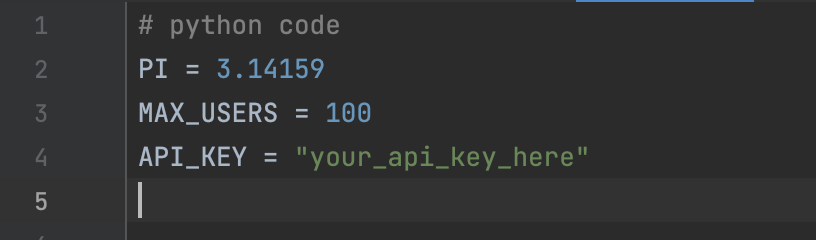
By naming these values in uppercase, you signal to other developers (and your future self) that these values are fixed and should not be modified.
Why Use Python Constants?
Using constants in your code offers several benefits:
- Improved Readability: Constants make it clear what a value represents. For instance, seeing PI in your code is much more meaningful than seeing 3.14159 scattered throughout.
- Reduced Errors: By using constants, you avoid accidentally changing values that should remain fixed. This helps prevent bugs and makes your code more reliable.
- Easier Maintenance: If you need to update a value, you only have to change it in one place. For example, if the MAX_USERS limit changes, you only need to update the constant definition.
Real-World Example of Python Constants
Let’s say you’re building a program to calculate the area of a circle. Instead of hardcoding the value of Pi every time, you can define it as a constant:
# python code
PI = 3.14159
def calculate_area(radius):
    return PI * (radius ** 2)
print(calculate_area(5))  # Output: 78.53975
In this example, using PI as a constant makes the code cleaner and easier to understand. If you ever need to update the precision of Pi, you only need to change it once.
Best Practices for Using Python Constants
To make the most of constants in Python, follow these best practices:
- Use Uppercase Naming: Always name your constants in uppercase with underscores separating words (e.g., MAX_CONNECTIONS). This convention makes constants stand out in your code.
- Group Related Constants: If you have multiple constants, consider grouping them in a separate module or file. For example:
# python code
# constants.py
PI = 3.14159
GRAVITY = 9.81
API_URL = "https://api.example.com"
Then, import them wherever needed:
# python code
from constants import PI, GRAVITY- Avoid Hardcoding Values: Instead of using magic numbers or strings directly in your code, define them as constants. This makes your code more maintainable and less prone to errors.
- Document Your Constants: Add comments or docstrings to explain the purpose of each constant, especially if its meaning isn’t immediately obvious.
Common Use Cases for Python Constants in Real-World Applications
Now that you understand the importance of Python constants and how they improve code readability, let’s explore some practical scenarios where constants are commonly used. These examples will help you see how constants can make your code more efficient and easier to manage in real-world applications.
1. Configuration Settings
Constants are perfect for storing configuration settings that don’t change during the execution of a program. For example, if you’re building a web application, you might store API endpoints, database credentials, or environment-specific settings as constants:
# python code
# Configuration constants
DATABASE_URL = "postgresql://user:password@localhost:5432/mydatabase"
API_ENDPOINT = "https://api.example.com/v1/data"
DEBUG_MODE = True
By using constants, you can easily update these values in one place without searching through your entire codebase.
2. Mathematical and Scientific Calculations
In scientific or mathematical programs, constants like Pi, gravitational acceleration, or the speed of light are often used. Defining these values as constants ensures accuracy and clarity:
# python code
# Mathematical constants
PI = 3.14159
GRAVITY = 9.81
SPEED_OF_LIGHT = 299792458  # in meters per second
def calculate_circumference(radius):
    return 2 * PI * radius

print(calculate_circumference(10))  # Output: 62.8318
3. Business Rules and Limits
If your application involves business logic, constants can be used to define rules, limits, or thresholds. For instance, an e-commerce platform might use constants to set maximum order quantities or discount rates:
# python code
# Business rule constants

MAX_ORDER_QUANTITY = 10
DISCOUNT_RATE = 0.15  # 15% discount
TAX_RATE = 0.07  # 7% tax

def calculate_total(price, quantity):
    if quantity > MAX_ORDER_QUANTITY:
        raise ValueError("Order quantity exceeds the limit")
    return price * quantity * (1 + TAX_RATE) * (1 - DISCOUNT_RATE)

print(calculate_total(100, 2))  # Output: 181.9
4. Status Codes and Messages
In applications that involve HTTP requests or user interactions, constants can be used to define status codes, error messages, or success messages:
# python code
# Status constants

HTTP_SUCCESS = 200
HTTP_NOT_FOUND = 404
HTTP_SERVER_ERROR = 500
ERROR_MESSAGES = {
    HTTP_NOT_FOUND: "Resource not found",
    HTTP_SERVER_ERROR: "Internal server error",
}

def handle_response(status_code):
    if status_code == HTTP_SUCCESS:
        return "Request successful"
    return ERROR_MESSAGES.get(status_code, "Unknown error")

print(handle_response(404))  # Output: Resource not found
5. File Paths and Directories
If your program works with files or directories, constants can help you manage paths more effectively. This is especially useful when dealing with multiple environments (e.g., development, testing, production):
# python code
# File path constants

LOG_DIRECTORY = "/var/log/myapp/"
CONFIG_FILE = "/etc/myapp/config.yaml"
TEMP_DIRECTORY = "/tmp/myapp/"

def log_message(message):
    with open(LOG_DIRECTORY + "app.log", "a") as file:
        file.write(message + "\n")

log_message("Application started")
Why These Use Cases Matter
Using constants in these scenarios ensures that your code is:
- Easier to read: Constants provide meaningful names for values, making the code self-explanatory.
- Easier to maintain: Updating a value in one place avoids the risk of missing instances where the value is used.
- Less error-prone: Constants prevent accidental changes to fixed values, reducing bugs.
Advanced Tips for Working with Python Constants
Now that you’ve seen how Python constants can be used in real-world applications, let’s take it a step further. While constants are simple in concept, there are some advanced techniques and best practices that can help you use them more effectively. These tips will ensure your constants are not only functional but also scalable and well-organized.
1. Use a Separate Module for Constants
As your project grows, you may end up with a large number of constants. Instead of scattering them throughout your code, consider organizing them into a dedicated module. This makes it easier to manage and import constants across different parts of your application.
For example, create a file named constants.py:
# python code
# constants.py

PI = 3.14159
MAX_USERS = 100
API_KEY = "your_api_key_here"
DATABASE_URL = "postgresql://user:password@localhost:5432/mydatabase"
Then, import the constants wherever needed:
# python code

from constants import PI, MAX_USERS
def calculate_area(radius):
    return PI * (radius ** 2)

print(calculate_area(5))  # Output: 78.53975
This approach keeps your code clean and modular.
2. Use Enums for Related Constants
If you have a group of related constants, consider using Python’s Enum class. Enums provide a way to define a set of named values, making your code more readable and less error-prone.
For example, if you’re working with status codes:
# python code

from enum import Enum

class StatusCode(Enum):
    SUCCESS = 200
    NOT_FOUND = 404
    SERVER_ERROR = 500

def handle_response(status_code):
    if status_code == StatusCode.SUCCESS:
        return "Request successful"
    elif status_code == StatusCode.NOT_FOUND:
        return "Resource not found"
    elif status_code == StatusCode.SERVER_ERROR:
        return "Internal server error"
    else:
        return "Unknown error"

print(handle_response(StatusCode.NOT_FOUND))  # Output: Resource not found
Enums make it clear that the constants are related and provide additional type safety.
3. Use Constants for Magic Numbers
Magic numbers are hardcoded values in your code that lack context. Replacing them with constants improves readability and makes your code easier to maintain.
For example, instead of:
# python code

def calculate_discount(price):
    return price * 0.15  # What does 0.15 mean?
Use a constant:
# python code

DISCOUNT_RATE = 0.15
def calculate_discount(price):
    return price * DISCOUNT_RATE
Now, it’s clear that 0.15 represents a discount rate.
4. Protect Constants from Modification
While Python doesn’t enforce immutability for constants, you can use naming conventions and code reviews to ensure they aren’t accidentally modified. Additionally, you can use classes or modules to encapsulate constants and prevent direct access.
For example:
# python code

class Constants:
    PI = 3.14159
    MAX_USERS = 100

# Access constants
print(Constants.PI)  # Output: 3.14159
This approach adds a layer of protection and organization.
5. Document Your Constants
Always add comments or docstrings to explain the purpose of your constants. This is especially important for constants that might not be immediately obvious to others (or your future self).
For example:
# python code
# The maximum number of users allowed in the system
MAX_USERS = 100
# The API key for accessing the external service
API_KEY = "your_api_key_here"
Good documentation ensures that everyone understands the role of each constant.
6. Use Constants for Environment-Specific Values
If your application runs in different environments (e.g., development, testing, production), use constants to manage environment-specific values. You can even load these values from environment variables for added flexibility.
For example:
# python code

import os
# Load constants from environment variables
DATABASE_URL = os.getenv("DATABASE_URL", "default_database_url")
DEBUG_MODE = os.getenv("DEBUG_MODE", "False").lower() == "true"
Conclusion
Throughout this blog post, we’ve explored the importance of Python constants and how they can significantly improve the readability, maintainability, and reliability of your code. From defining simple values like PI or MAX_USERS to organizing them into modules or using enums for related constants, constants are a powerful tool in your Python programming toolkit.
By using constants, you can:
- Enhance readability: Replace magic numbers and hardcoded values with meaningful names that make your code self-explanatory.
- Reduce errors: Prevent accidental changes to fixed values, ensuring your program behaves as expected.
- Simplify maintenance: Update values in one place instead of searching through your entire codebase.
- Scale your projects: Organize constants into modules or classes to keep your code clean and modular as your application grows